Sending payment reminders for auction items
To send payment reminders for auction items simply follow these steps.
To send payment reminders for auction items simply follow these steps.
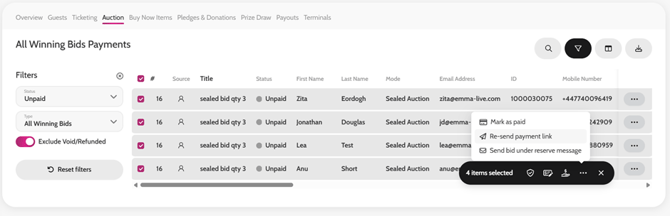
- Go to Payments > Auction
- Select Type as All Winning Bids
- Select Status as Unpaid (filter at the top left)
- Select all by ticking the tickbox on the left of ‘Item Number’
- Hover over the Bulk Action tool
- Select ‘Re-Send Payment Link’
You are able to personalise the communication that goes out in Comms > Templates > Payments > Guest Pay Link
Re-sending Payment Links for Auction Items