Adding a custom URL to your event
If you'd like to add a customised private domain/URL to your event, please contact us at support@smartgalas.com for assistance. Please note this service comes at an additional charge.
To add a customised private domain/URL to your event simply follow these steps.
Step 1: Let us know the private domain you'd like or purchase a private domain from a domain agent (e.g. 123reg or Go Daddy).
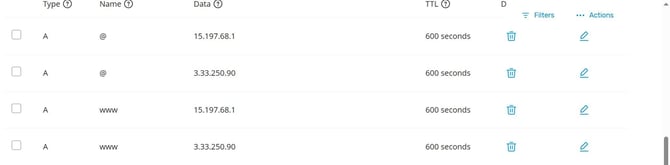
Step 2: Once the domain is purchased, using the DNS A records, point the A record towards our 2 IP addresses:
- Add the first A record value and point it to the IP 15.197.68.1
- Add the second A record value and point it to the IP 3.33.250.90
Note: It is important that no other A records are present on the DNS settings, as this could conflict with the IP addresses above. Please delete any other A records that exist, or if they cant be deleted, then check your domain forewarding settings.
Step 3: Set the TTL as low as possible.
Step 4: Let your Smart Galas Project Manager know that the A records have been pointed.
Step 5: Smart Galas team generates the SSL Certificate for your domain and adds the private domain to your event. Your private domain will now be ready to use.
Adding DNS A record values

Note: If you are using a subdomain, add the two IP addresses as 2 extra A record values. If your domain provider does not allow it, simply duplicate the A record for the subdomain twice and add the IP address above for each, like below.